

Create a module
A new module in your revision: its title, type, language and audience.
A new module is created in your revision. Start or choose a draft revision first: see Start a revision.
- Choose Content in the sidebar.
- Choose New module at the top right.
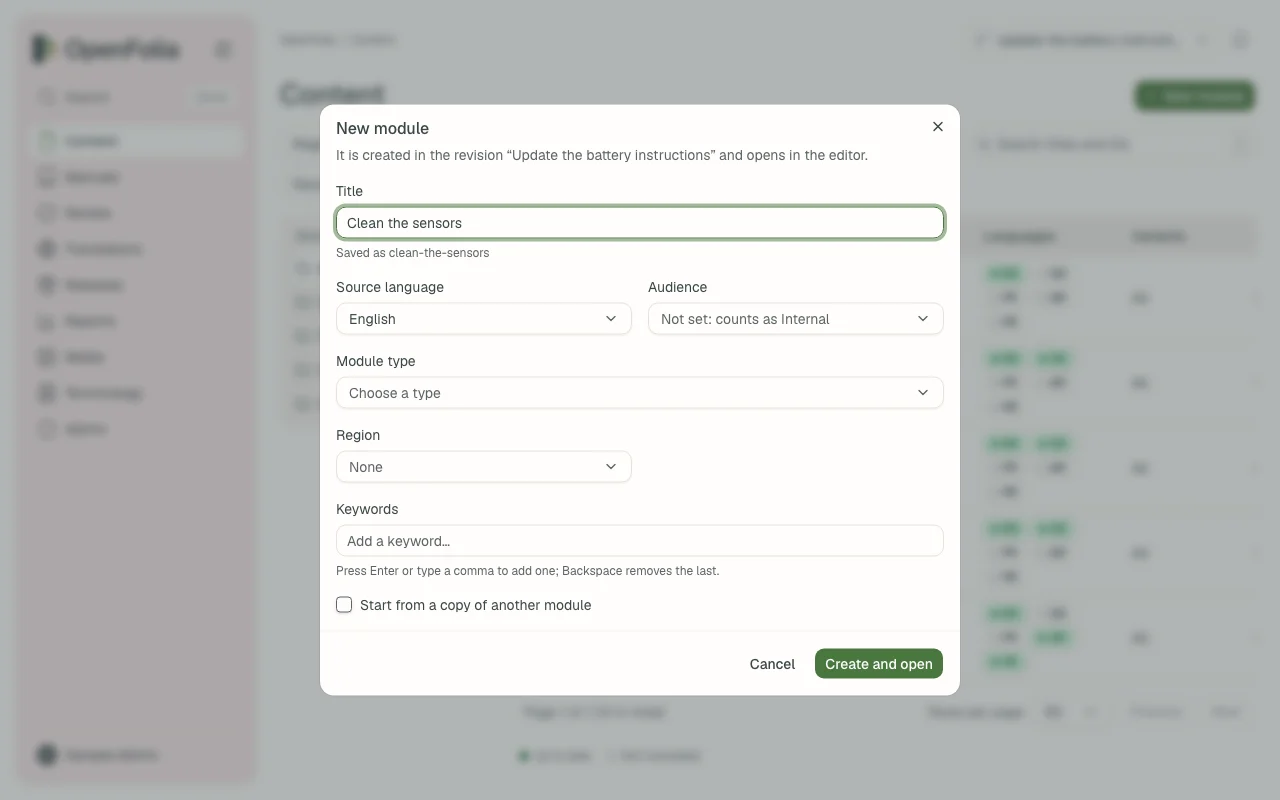
- Enter a Title. Below it you see the ID the module gets: Saved as clean-the-sensors.
- Check the Source language: the language you write it in.
- Choose the Module type, such as Procedure or Safety.
- Choose the Audience: who may read it. Without one, it counts as the most restricted level, shown as Not set: counts as Internal. See Audiences.
- Fill in the fields your project adds, such as Region, and add Keywords if you like: press Enter or type a comma after each.
- Choose Create and open.
The module opens in the editor, empty and locked for you.
Start from a copy
To begin with the text of another module, tick Start from a copy of another module and choose the Module to copy. The new module gets its blocks; the original stays as it is.
When the title is taken
The ID is made from the title. If a module with that ID exists, the dialog says so. Choose another title.