

Reuse a module
Include one module inside another, or one block of it, kept in sync, or link to it.
Write a text once and use it in many modules: include the module where you need it. A change to it then shows everywhere it is included.
- Put the caret where the module should go.
- Choose Insert, then Module reference. Or type
/moduleand press Enter. - In Insert module reference, type in Search modules, and use Filters to narrow the list.
- Choose a module. Its text shows in the preview beside the list, so you can check it is the right one.
- Under Insert, choose how:
- Whole module, kept in sync: the module is included here as it is.
- One block from it: only one block of the module, such as a table, a safety notice or a paragraph. The preview turns into a list of the module's blocks: choose the one to include.
- Link only: a cross-reference in the text, which leads to the module.
- Choose Insert.
The included module shows in a frame: Included here, edited in its own place. To change its text, open it from the frame and edit it there.
One block of a module
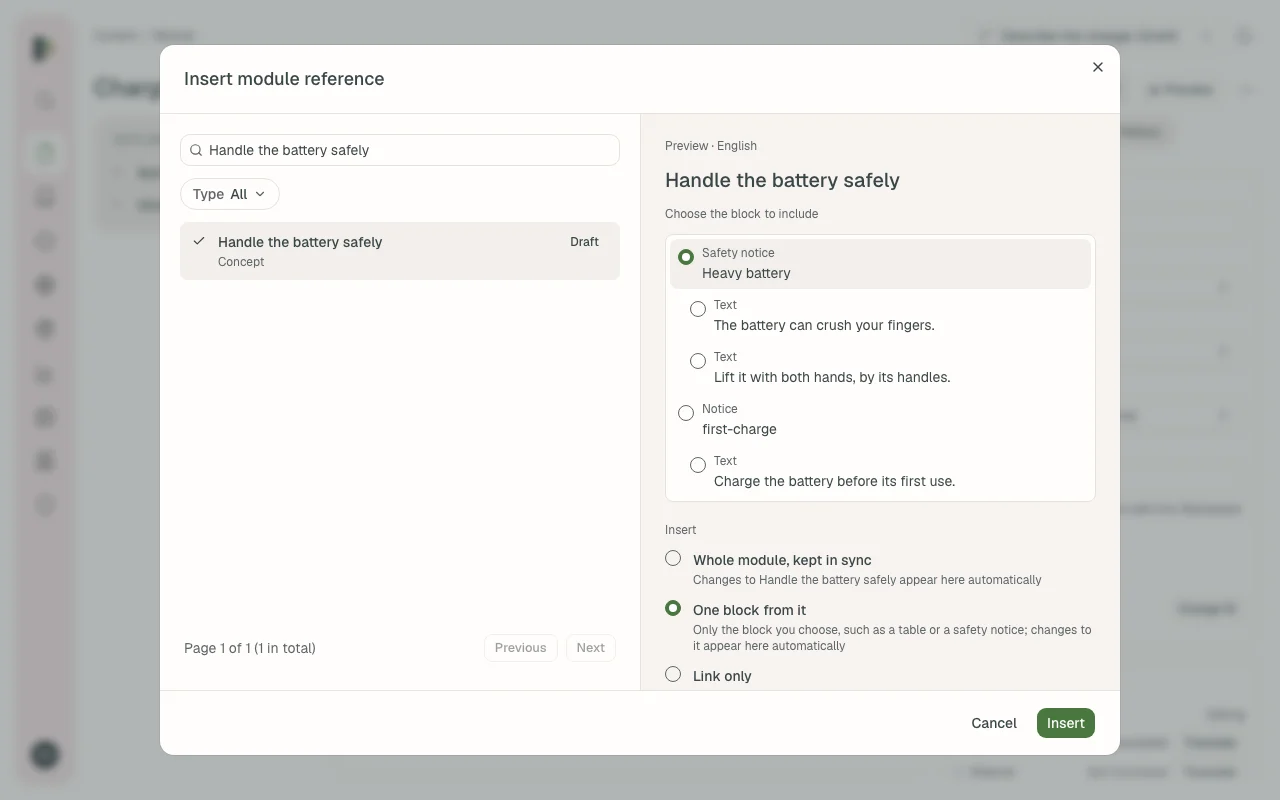
A block included on its own is kept in sync like a whole module: when the block changes in its module, the change shows here too. Its frame names the block by its type and text. Open opens its module at that block.
Variants apply as anywhere: a block inside a variant block of its module is included only in the variants that show it.
If the block is later removed from its module, the frame says The block “…” is not in this module, and the checks report a Broken module reference (blocking). Choose another block, or remove the reference.
When it cannot be included
A module cannot include itself, nor a module that already includes it. The dialog says so: such a loop would never end. This holds for one block of a module too: a module that already includes this one gives none of its blocks either, and a module cannot include a block of itself.