

Move, copy and delete blocks
The block actions menu, dragging, and moving blocks with the keyboard.
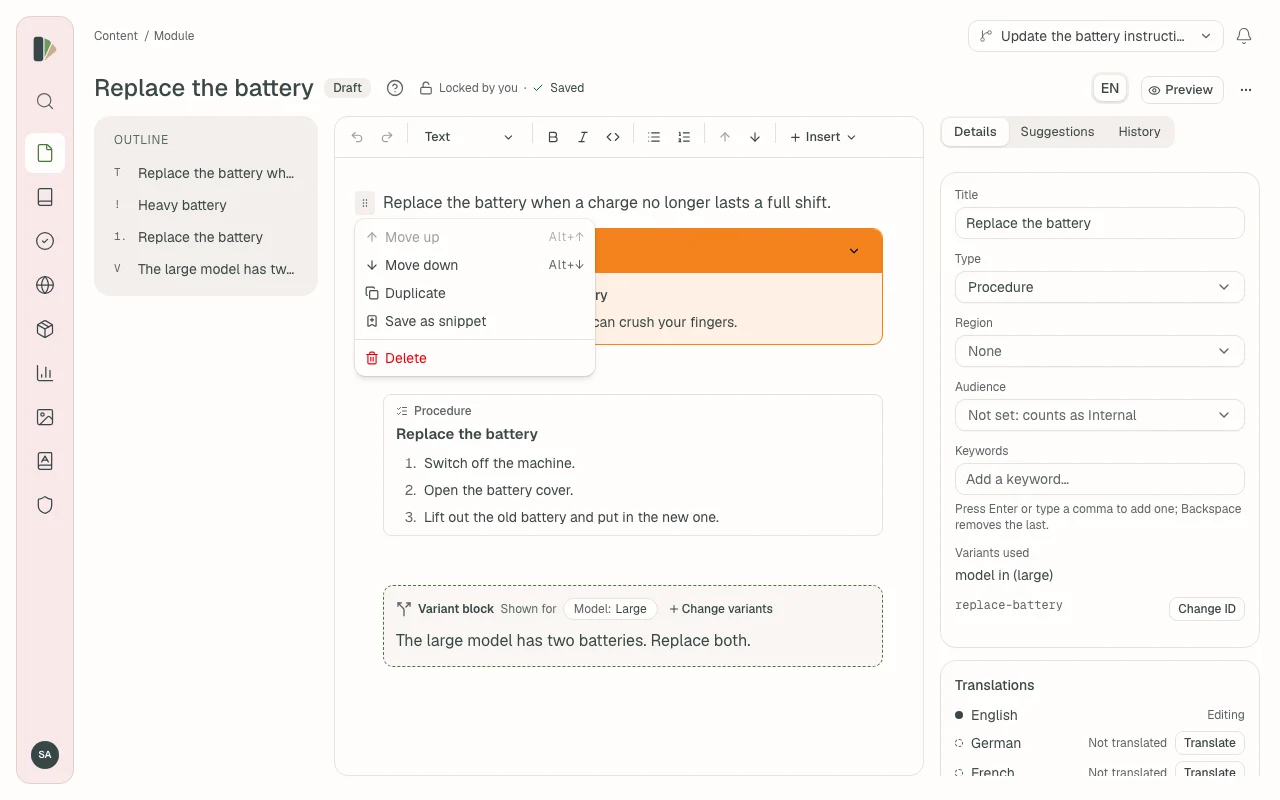
With the block actions menu
- Point at a block. A grip (⠿) appears to its left.
- Choose the grip. Or put the caret in the block and press Shift F10.
- Choose what to do:
- Move up or Move down: one place up or down.
- Duplicate: a copy below it.
- Save as snippet: makes reusable wording of it. See Snippets.
- Delete: removes it. Undo brings it back.
By dragging
Drag a block by its grip to its new place. A line shows where it lands. You can drag a block out of a notice or a list, too.
With the keyboard
- Alt ↑ and Alt ↓ move the block with the caret (⌥ on a Mac). The arrows in the toolbar do the same.
- Tab and Shift Tab indent and outdent a list item.