

Suggest a change
Without editing rights, suggest a change to a module; a reviewer checks it before it is published.
Some roles may not edit content directly but may suggest changes, for example someone in service who spots a wrong value. A suggestion is a revision of its own with one module in it. A reviewer checks it, like any revision.
Suggest a change to a module
- Open the module from Content. It opens read-only: Read-only: suggest a change to edit it.
- Choose Suggest a change at the top right. A revision named after the module is started, and the module opens for editing in it.
- Make your change in the text.
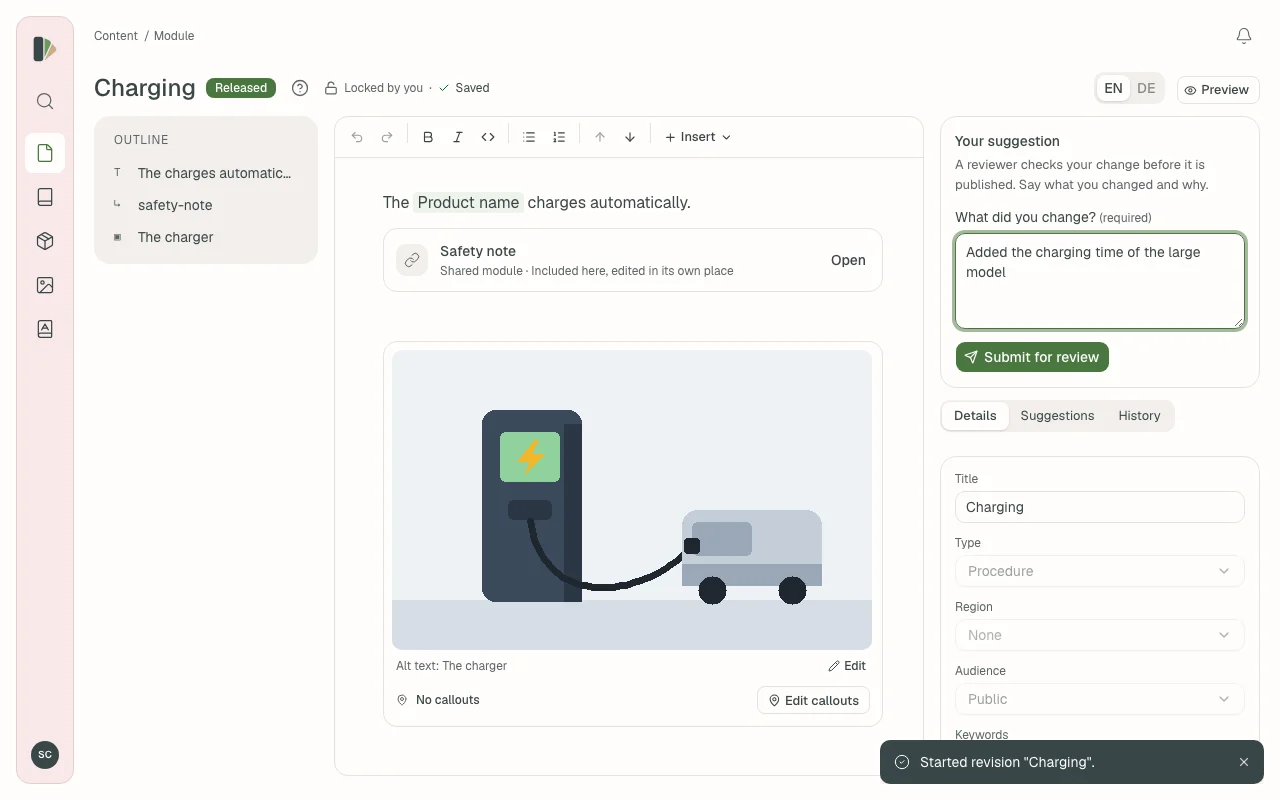
- Under Your suggestion, fill in What did you change?: what you changed and why. Reviewers read this first.
- Choose Submit for review.
The module is read-only again: Read-only: your suggestion is in review. Once approved, it waits to be published with the next merge.
Suggest a new module
In Content, choose Suggest a new module. It is suggested in a revision of its own, named after it, and opens in the editor. Write it, then submit it as above.
Who can suggest
Your role decides whether you edit or suggest: see Roles. Someone who may edit can use Suggest a change too, as a short cut: it starts a revision for that module and chooses it.