

Start a revision
Start a revision, switch between revisions and rename one.
You change content only inside a revision. A revision collects your edits until it is reviewed and merged. Nobody else reads them before that.
Start a revision
- Open the revision menu at the top right.
- Choose New revision.
- Enter a Title: what you are going to change.
- Choose Start.
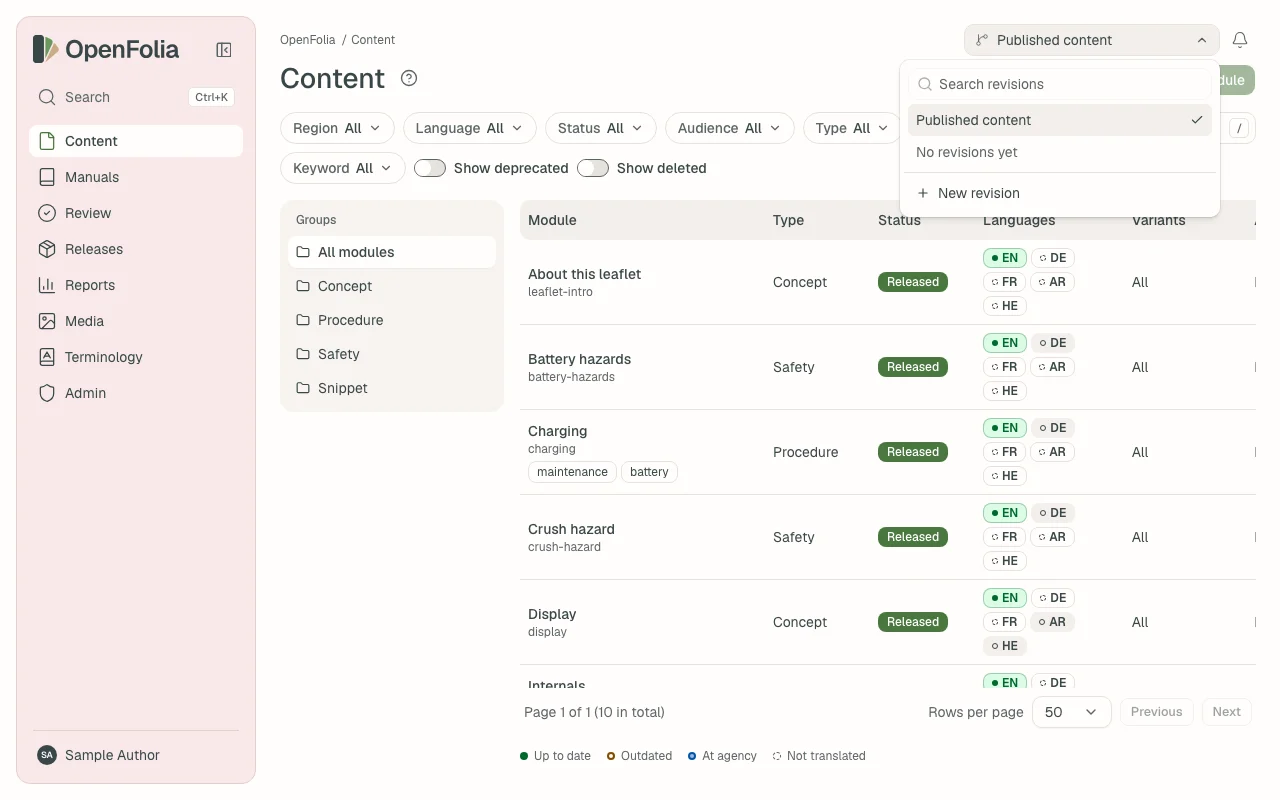
The menu now shows your revision, and every page reads from it. A module you open in it is locked for you, so nobody else changes it at the same time.
Switch to another revision
- Open the revision menu.
- Type in Search revisions to find one, or pick it from the list. Each shows its state: Draft, In review or Approved.
Choose Published content to read what everyone reads again. Your revision keeps its changes.
You can also switch from the search palette: press Ctrl K and choose Switch revision.
Rename a revision
- Switch to the revision.
- Open the revision menu and choose Rename revision.
- Change the Title, and add a Description: what it changes and why.
- Choose Save.
What happens next
- Submit it for review when your changes are done.
- Update it from main when others merged changes meanwhile.