

Right-to-left languages
Write and preview Arabic, Hebrew and other right-to-left languages: the text runs from the right, the editor around it stays in your language.
Arabic, Hebrew and other languages written from right to left are edited, previewed and printed right to left. You do not set anything: each language's direction comes with it.
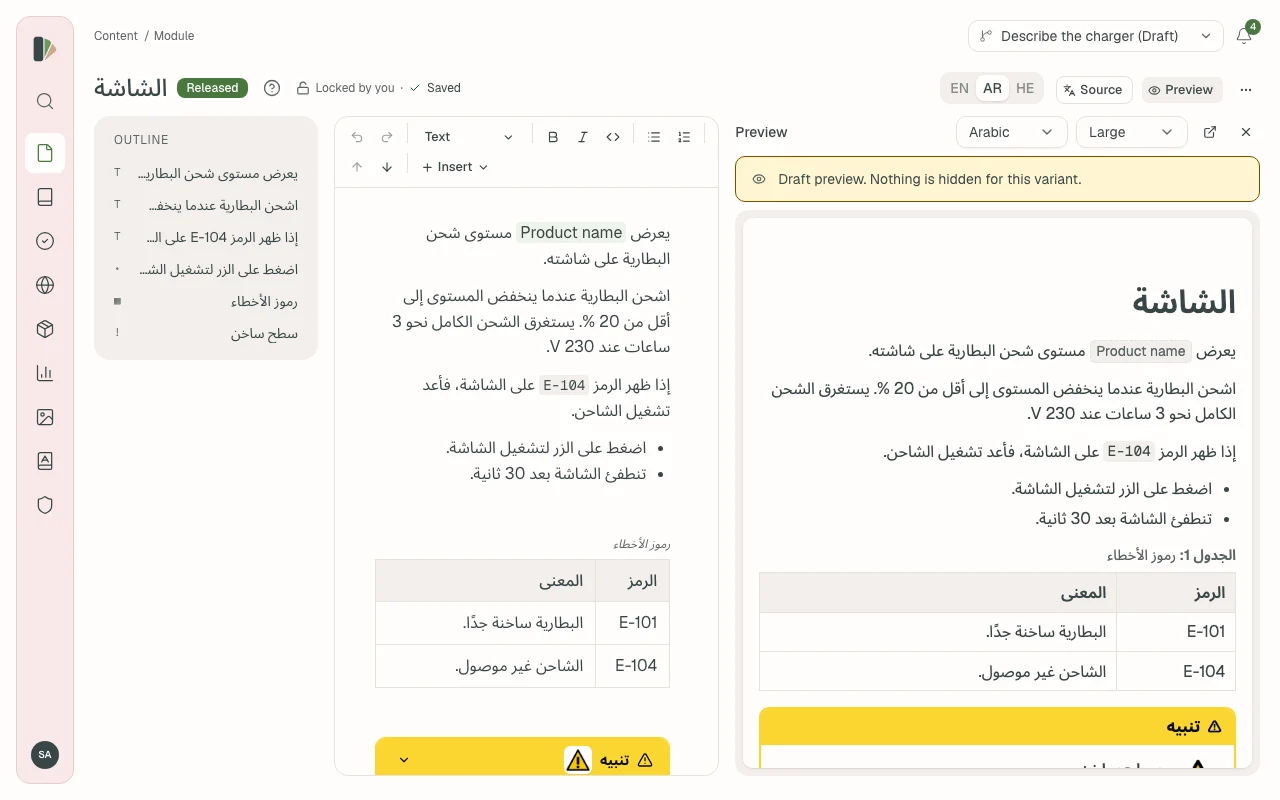
Edit a module right to left
- Open the module and choose its language in the header, such as AR.
- Type as in any other language. The text starts at the right, lists and tables run from the right, and the Outline follows.
The toolbar, the menus and the side panel stay in the language of your editor, left to right in English or German. A Latin product name, a number or code inside the Arabic text keeps its own order.
Preview and print
The preview of a right-to-left module is a right-to-left page; its Language menu switches to another language. The PDF mirrors the page too: margins, header and footer, lists, tables and the legend of a callout image change sides. Code and addresses stay left to right.
A module that has no version in the language yet is shown from its source language, left to right, inside the right-to-left manual.
Who sets the direction
Each language takes its direction from its script, so Arabic and Hebrew are right to left without
any set-up. Administrators see each language's direction in the project's language settings: Left
to right or Right to left. An administrator can set it otherwise in the configuration.
A direction set there for a language the project does not have does nothing: GET /config lists it in
meta.directionIssues, and the next save of the settings leaves it out.