

Cross-references
Link to a section, figure, table, procedure or step, in this module or in another one.
A cross-reference points the reader to another place in the documentation: a section, a figure, a table, a procedure or one of its steps. It can point into this module or into another one.
Add a cross-reference
- Put the caret where the reference should go, for example after "see ".
- Type /, then
cross, and choose Cross-reference. - Choose the target. Type in Find a target… to narrow the list.
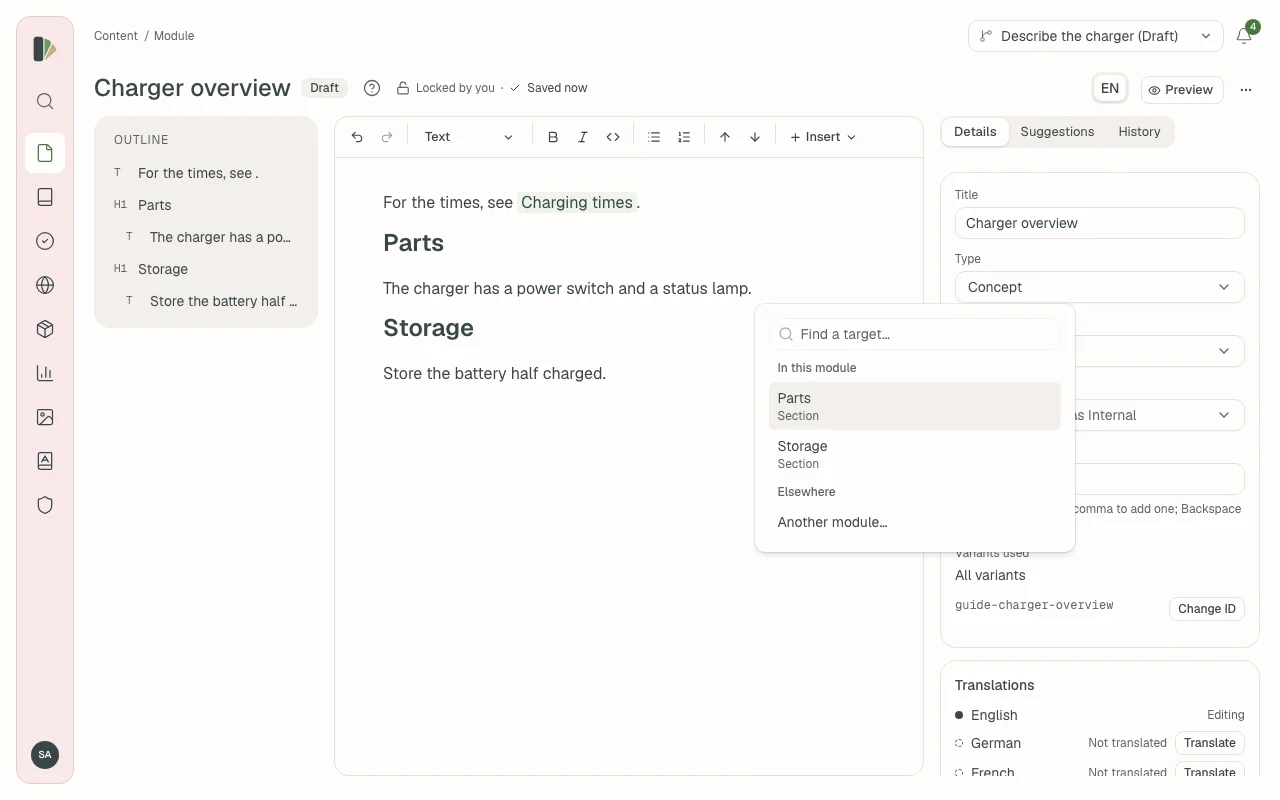
The list has these groups:
- In this module: its sections, figures, tables, procedures and steps. Each says its kind, such as Section or Figure.
- One group for each module this module includes with a module reference. Whole module links to that module itself.
- Elsewhere: Another module… lets you choose any module, then its target.
The reference shows in the text as a chip with its target's words, such as a section's title.
Change or remove a cross-reference
- To point it elsewhere, click the chip and choose another target.
- To remove it, put the caret after it and press Backspace.
When the target is gone
When its target or its module is deleted, the chip is marked. Pointing at it says why: Broken cross-reference: its target is no longer in …, or Broken cross-reference: the module … can't be found. Choose a new target.
The checks also report a cross-reference whose target is missing, or is not in the manual being built. See Run the checks.