

Find a module
The Content list: groups, filters, search and the language of each module.
Content lists every module of the revision you are reading.
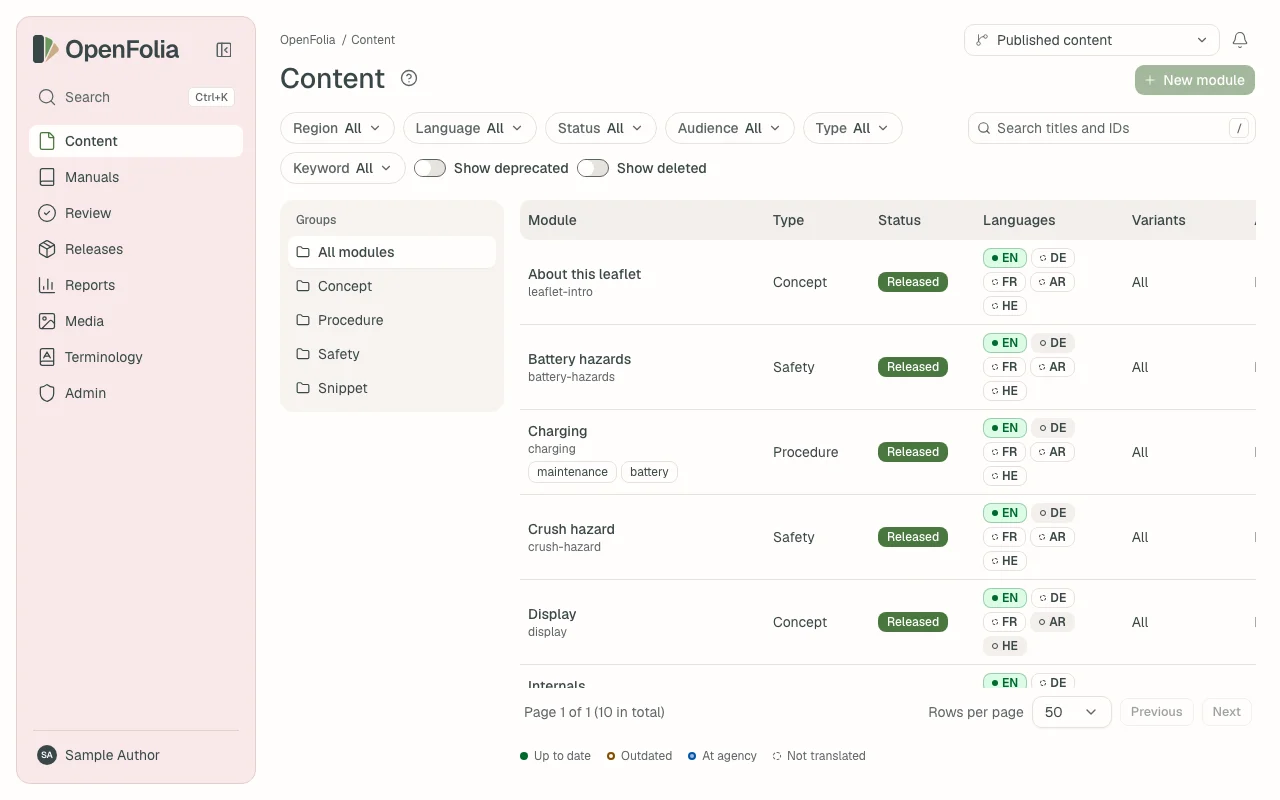
Find a module
- Choose Content in the sidebar.
- Narrow the list in one or more ways:
- Choose a group on the left. All modules shows every one; the other groups are the module types, such as Procedure or Safety.
- Type in Search titles and IDs. Press / to jump there.
- Use the filters above the list: Language, Status, Audience, Type, Keyword, and the ones your project adds (in the sample content, Region).
- Choose a module's title to open it.
Read the list
- Status shows whether the module is released or still a draft.
- Languages shows a badge per language with the state of its translation: a filled dot means Up to date, a ring Outdated, a half-filled ring At agency and a dashed circle Not translated. The legend below the list names each one. If your role does not show the translation status, a thin ring says only Translated: the language version is there.
- Variants shows which variants the module is for: All, or only some.
Deprecated and deleted modules
The list leaves them out. Turn on Show deprecated or Show deleted to see them too.
Many modules
The list shows a page at a time. Choose Next and Previous below it, and how many Rows per page. The filters and the page stay in the address, so a link shows the same list.