

Review the style
A language model suggests better wording for a module; you apply, show or dismiss each suggestion.
The style review asks a language model for wording changes to a module: its text, titles, alt texts and the legends of image callouts. Nothing changes until you apply a suggestion.
The style review is off unless your admin sets it up. Without it, the Suggestions tab has no
Review style; the writing checks are there all the same. Admins: see
CCMS_STYLE_REVIEW_URL in the settings reference.
Review a module
- Open the module in your draft revision.
- Choose Suggestions in the side panel.
- Choose Review style. The model reads the module as saved.
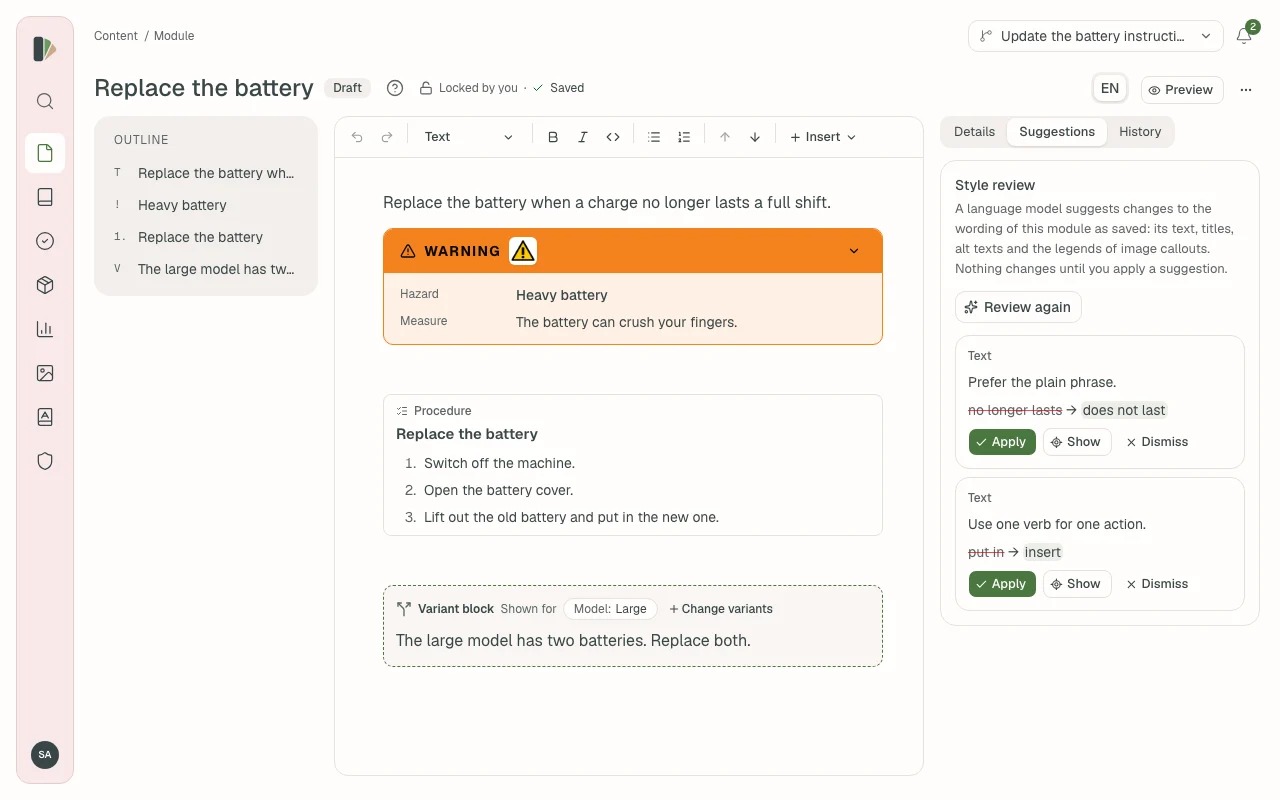
Each suggestion names what it is about (Text, Title, Alt text, Callout legend, …), says why, and shows the text now struck through beside the suggested text.
Act on a suggestion
- Apply puts the suggested text in place and saves it. The toast offers Undo.
- Show takes you to the text in the module, for a callout legend to its callout in the image.
- Dismiss removes the suggestion from the list.
Each suggestion is also marked in the text, with a dashed underline. Point at it, or put the caret in it and press Alt+Enter, for its card with Apply and Dismiss.
Review again asks for new suggestions, for example after you changed the module.
When the text changed meanwhile
A suggestion fits the text as it was reviewed. If you changed that text since, Apply refuses it: The text changed since the review, so the suggestion was not applied. Review again. The suggestion then says so in place of Apply. Dismiss it, or choose Review again.