

Run the checks
Check a manual or a revision before release, and fix what the checks find.
The checks look for what would go wrong in a release: a missing module, a broken link, an outdated translation, a page design that does not fit. Run them before you submit a revision and before a release.
Run them
- For a manual: open it in Manuals, choose ⋯ at the top right, then Run checks.
- For a revision: the review page of a revision shows its checks at a glance. Choose them to open Checks before release for what the revision changes.
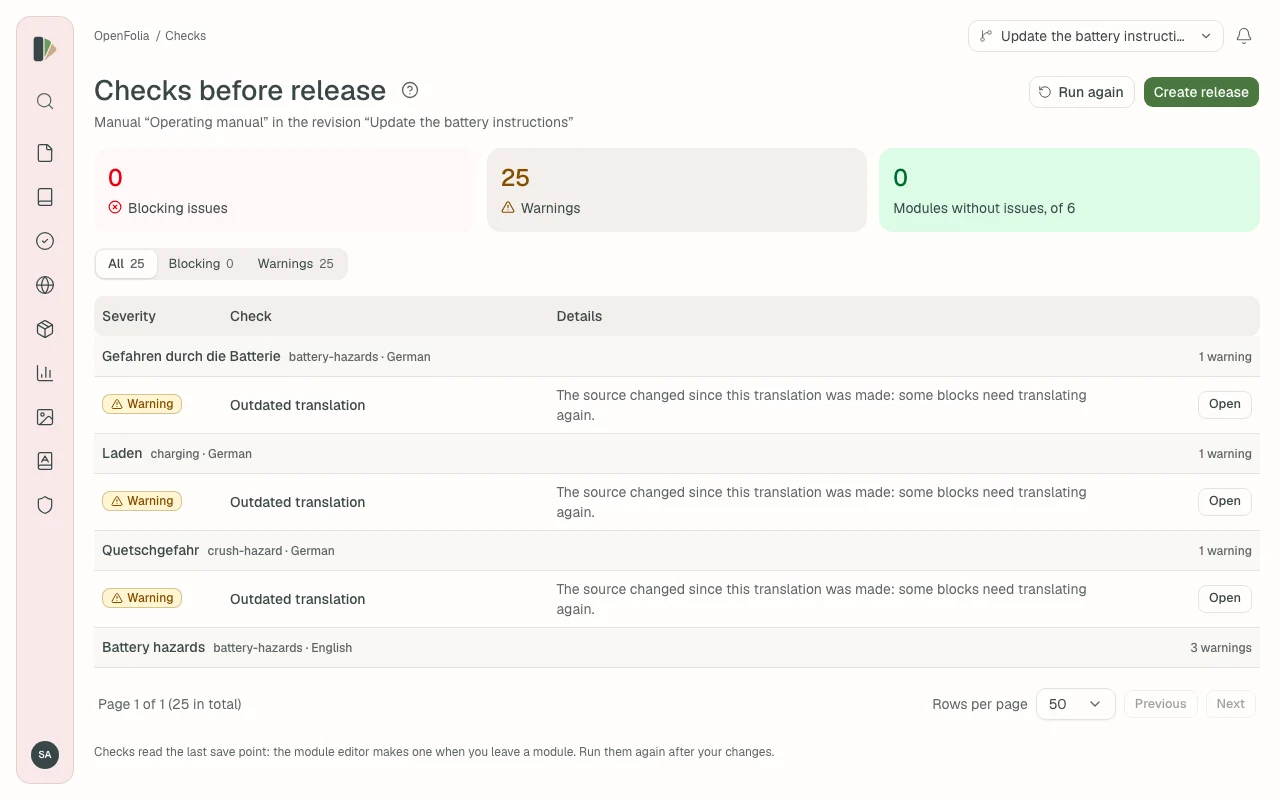
Read them
The line under the title says what was checked, for example Manual “Operating manual” in the revision “Update the battery instructions”. Three counts follow:
- Blocking issues: these stop a release. Fix them all.
- Warnings: worth a look. They do not stop a release.
- Modules without issues: how many of the checked modules are clean.
Choose All, Blocking or Warnings to filter the list. Each issue sits under its module and language, with its Check and its Details.
Fix them
- Choose Open beside an issue. The module opens, or Go to block takes you to the very block.
- Fix what the details say.
- Choose Run again.
The checks read the last save point. The module editor makes one when you leave a module, so run them again after your changes.
When nothing blocks, Create release starts a release of the manual.