

The audit log
See who changed what and when, filter the log, and export it as CSV or JSON Lines.
The audit log records every change of state: a revision approved, a role assigned, a webhook deleted, an export made. Each event says when, who acted, what happened, to what, and the comment given. Events are never changed.
Read the log
- Open Admin, then Audit log. The newest events come first.
- Choose the arrow at the start of a row (Show details) to see everything the event records.
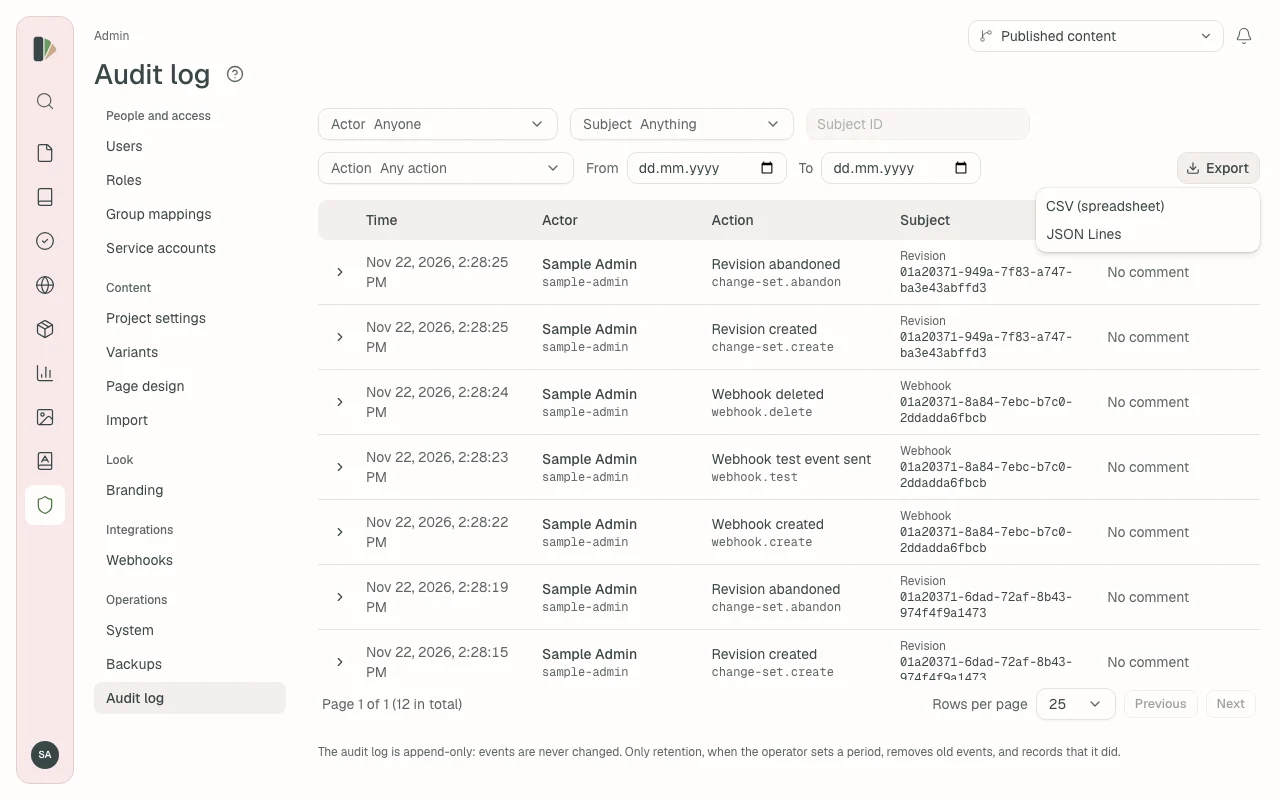
An action the editor knows is shown in words, with its key below, for example Revision
approved over change-set.approve. The subject links to the module, the manual or the
revision's review where it can.
A revision an author approved alone is marked By its author. See Approve your own revision.
Filter the log
- Actor: anyone, any person, any service account, or one of them.
- Subject: the kind of thing it happened to; Subject ID narrows it to one.
- Action: one kind of event.
- From and To: a range of days, both included.
Clear filters shows everything again. The filters are in the page's address, so a filtered log can be bookmarked or shared.
From a module or a review, Show in audit log in its menu opens the log filtered to it.
Export the log
- Set the filters for what you need, for example a range of days.
- Choose Export, then CSV (spreadsheet) or JSON Lines.
- The file holds every event the filters select, not only the page you see.
Each export is itself recorded in the log: Audit log exported.
Old events
The person who runs the server can set a retention period. Older events are then removed, and the removal is recorded in the log: Old audit events removed.