

Service accounts and tokens
Let a portal build, a pipeline or an agent call the API with roles and tokens of its own.
A service account is a machine client, such as a portal build, a pipeline or an agent. It holds roles like a person, and calls the API with tokens of its own. A token is shown once, when it is issued.
Add a service account
- Open Admin, then Service accounts.
- Choose New service account.
- Fill in Name and, if you like, Description. The Service account ID is made from the name. It cannot be changed later.
- Under Roles, choose its roles. Roles that manage access (admin.roles) are not offered.
- Choose Add service account.
Issue a token
- In the service account's row, choose Tokens.
- Choose Issue token.
- Under What it is for, say where the token goes, for example "Portal build, production". It shows in the list and in the audit log.
- Under Expires after, choose how long it lasts: 30, 90, 180 or 365 days.
- Choose Issue.
- Copy the token now: choose Copy token and store it where its client reads it. Then choose Done.
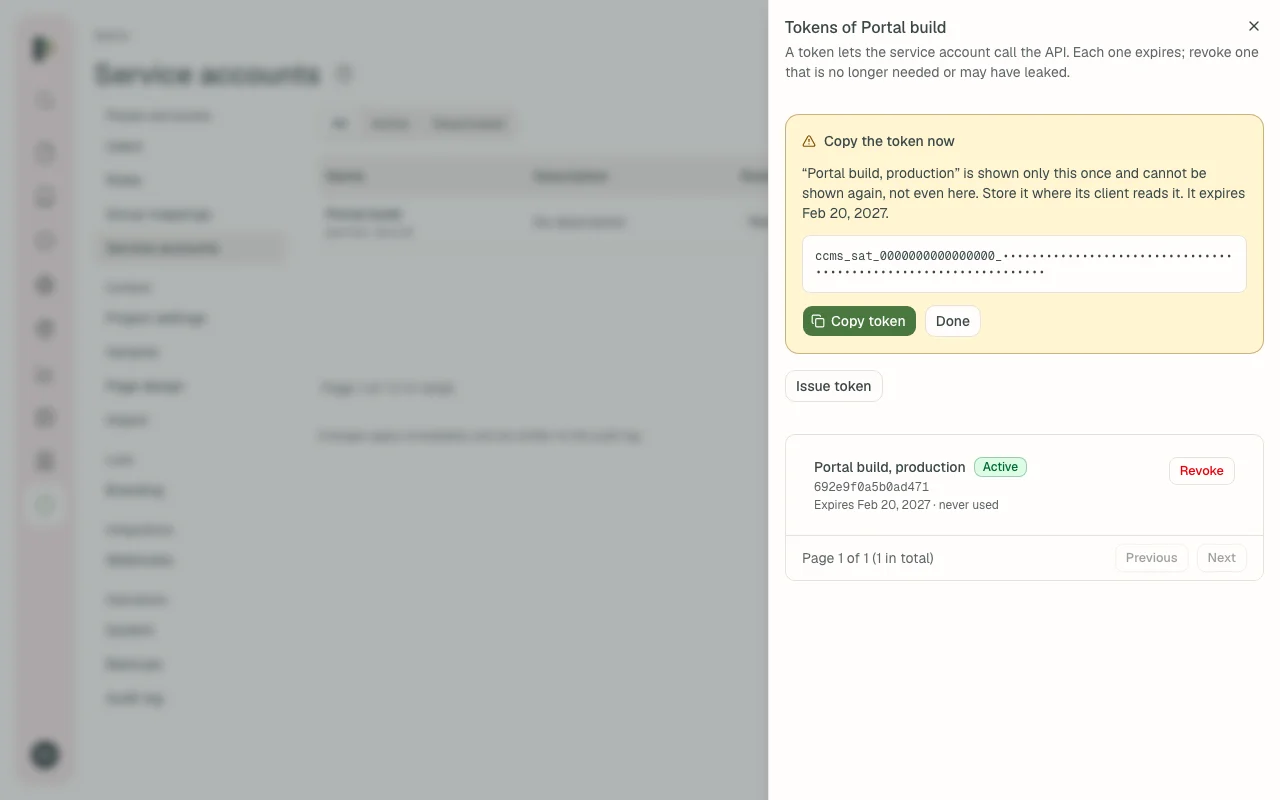
The token cannot be shown again, not even here. If it is lost, issue a new one and revoke the old one.
The list shows each token's name, its expiry, when it was last used, and its state: Active, Expired or Revoked. Issue one token for each client that calls the API, so you can revoke one without stopping the others.
Revoke a token
Choose Revoke beside the token, and confirm. Every client using it is refused from its next request on. A revoked token cannot be restored.
Deactivate a service account
Choose Deactivate in its row, and confirm. None of its tokens can act any more, and every lock it holds is released. Its roles and tokens stay: Reactivate brings back the tokens that are neither revoked nor expired.