

The System page
The storage used, the instance, email, the background work and the hints when something needs attention.
Admin › System shows the state of the installation. Most of it is set on the server by whoever runs it; the page says what is set, and what to do when something needs attention.
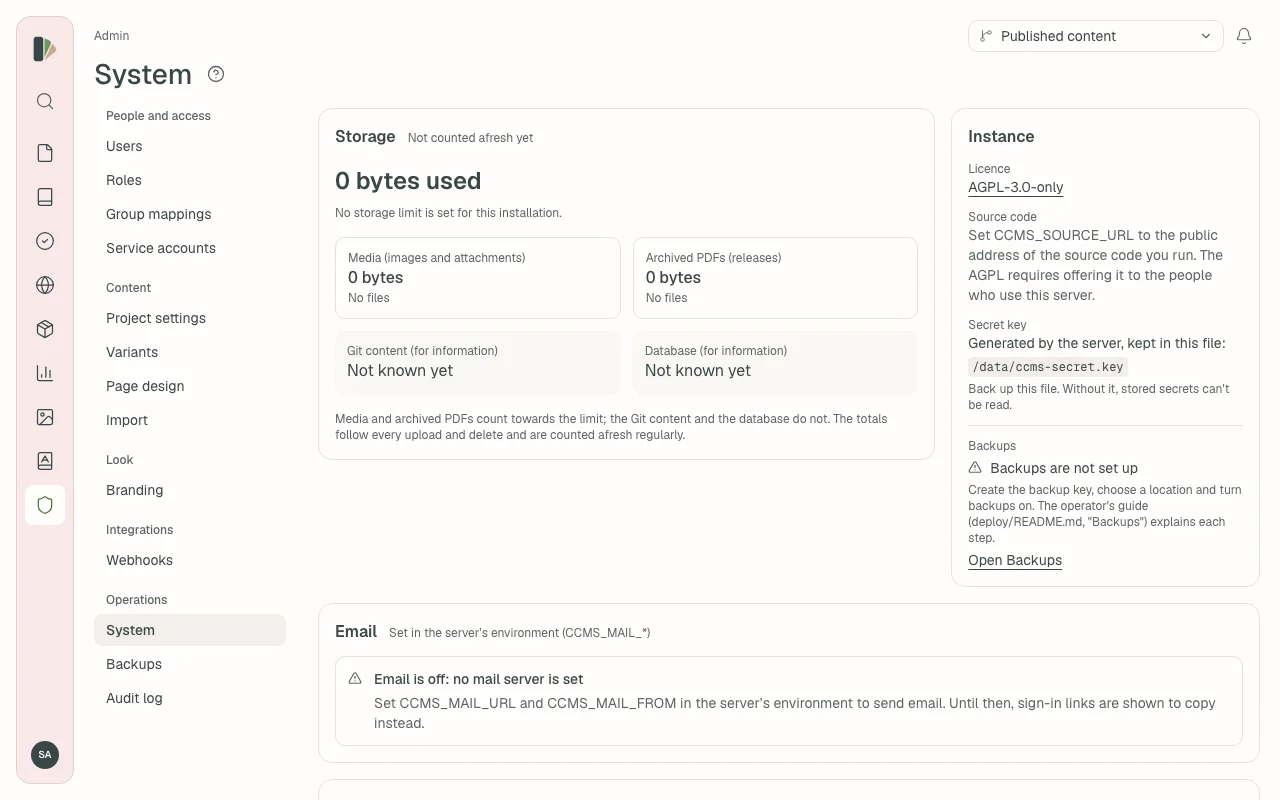
Storage
Storage shows how much the installation uses: Media (images and attachments) and Archived PDFs (releases), which count towards a storage limit, and the Git content and the database, for information.
When a limit is set, the page warns from 80 % of it. Once the limit is reached, new uploads are refused. Show unused files opens the files nobody uses, to delete them. Largest files lists the biggest uploads, each linking to the media library.
Instance
Instance names the licence and where the source code is. Secret key says where the key that protects stored secrets, such as webhook secrets, is kept. Back up that file. Backups shows their status and links to Backups.
Email shows whether the server sends email, and through which mail server. The settings are in the server's environment, so they are read-only here.
- Email is off: no mail server is set: until one is set, sign-in links are shown to copy instead of being emailed.
- Email is off: it needs the instance secret key: a mail server is set, but the server has no secret key. Where the secret key is set jumps to it.
When email is on, Send a test email sends one to you. It should arrive within a minute; a failure shows in the audit log.
Background work
Background work shows the workers that make release files, run imports and deliver webhooks: how many run, how many jobs wait, and the longest wait.
- Jobs are waiting, and no worker takes them: ask whoever runs the server to check that the worker service runs and reaches the database.
- Delivery is held after a restore: the database was restored from another server, and notifications, webhooks and the change feed wait for one more step. How to finish the restore opens After a restore. Nothing is lost meanwhile.