

Page design, manual and label texts
Texts outside a module that are translated too: a page design’s title and back page text, callout legends, a manual’s title, group titles and cover image text, and the project’s labels.
Most text lives in modules. A few texts live elsewhere and are translated the same way: they show in the translation status, go out in a delta export and come back with an import.
Page design text
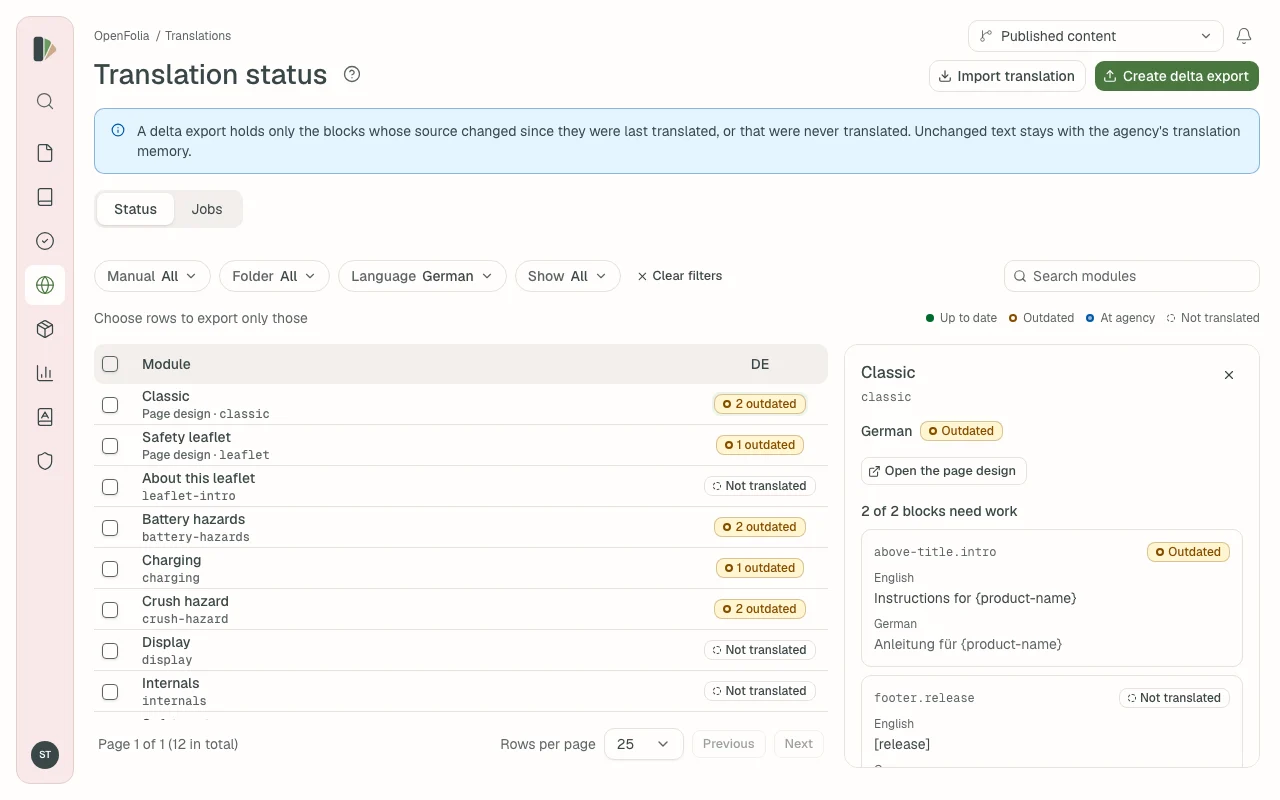
A page design's free text, such as a subtitle or an imprint on the back page, is a row of its own in the Status tab. It says Page design under its name.
- Choose Translations in the sidebar.
- Choose the cell of a page design, for example Classic in the DE column.
- The details list each text that needs work, with the source and the translation. Placeholders
such as
{product-name}stay as they are. - Open the page design opens it, to translate a text there yourself.
A page design without a text in a language prints the source language's text there. A manual's checks report this.
Callout legends
The legend of an image callout belongs to its module. It is translated with the module's other blocks and needs nothing extra.
Manual text
A manual's title, the titles of its groups and its cover image's alternative text (for screen readers) are a row of their own, marked Manual text. Its details list each text: Title, Group title, The manual’s cover image or the cover image of a variant. Open the manual opens the manual. You can also type a translation there yourself: see Manual settings.
Project labels
The labels of the project settings are one row for the whole project, Project labels, at the top of the table: module types, audiences, facets and their values, variant attributes and their values, text attributes and safety symbols. PDFs and the portal show them in the manual's language, and the editor in each person's interface language. Its details list each label; Open the project settings opens them, to type a translation yourself: see Project settings.
A label that is the same in every language, such as a product name, still counts as untranslated until a translation brings it back unchanged.
Export and import them
Page designs, manual texts, the project labels and modules go in exports of their own. Choose the rows of one kind in the Status tab, then Create delta export. The line above the table names what you chose, for example 1 page design chosen or Project labels chosen. The import puts the texts back into the design, the manual or the project settings; exporting and importing the labels need the right to change the project settings.
When the source text changes, the manual's checks say how many texts of the page design or of the manual need translating again. The translation report counts these texts too.
Who may change a translation record
A page design, a manual and the project settings each keep a record of the source text every translation was made from. The import writes it. Only a person who manages translations into a language may change that language's entry. This holds for every way a change reaches a revision: saving, a save point, Update from main, carrying a revision forward and submitting.
If a change by someone else would alter the entry of a language they do not manage, it is refused and nothing is saved. The editor says The request was not valid. Keep the record as it is, or ask a translation manager.
Taking the page design or manual out of the revision (Take out of this revision in Review) is always allowed: it puts back the record as main has it.