

See what needs translating
The translation status: every module, page design and cover image text by language, and the blocks that need work.
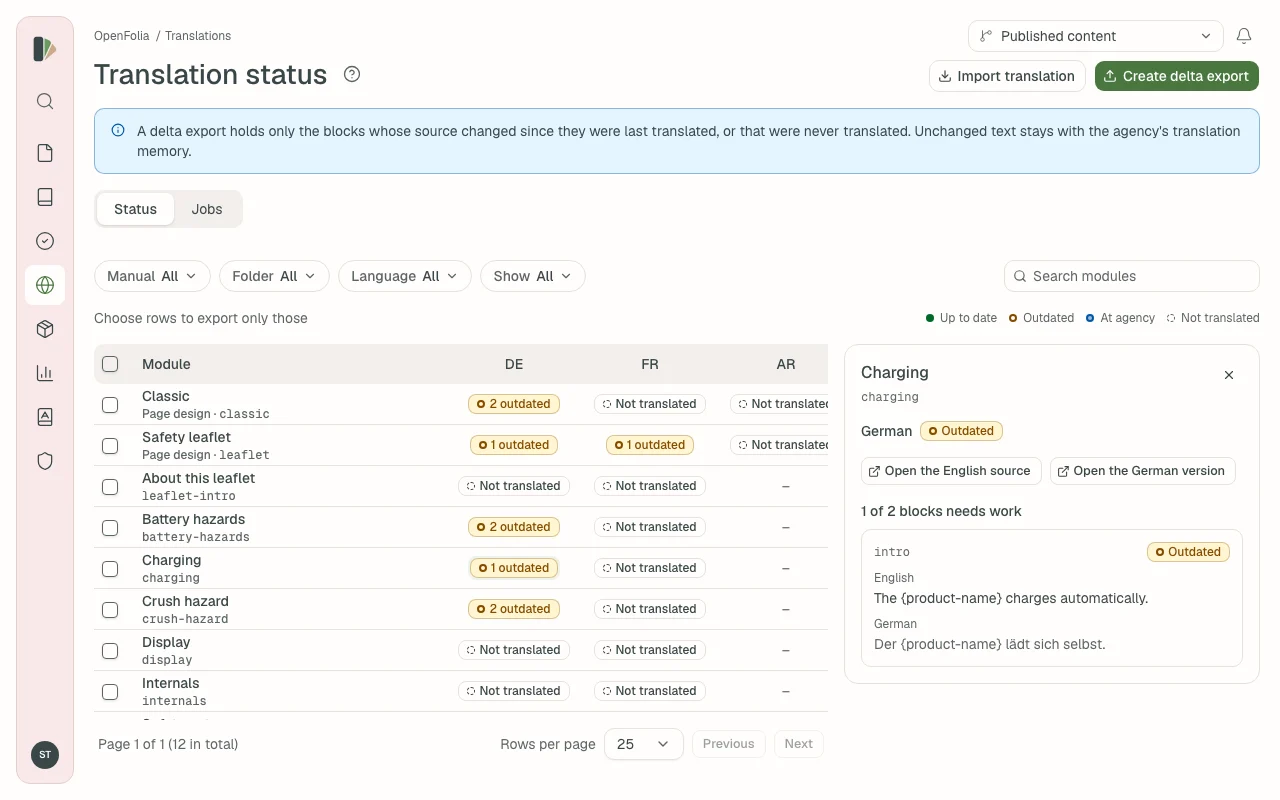
Translations shows how far each translation is. Every source module is a row, every translation language a column. Each cell says whether the translation is up to date, and how many blocks need work.
Open the status
- Choose Translations in the sidebar. The Status tab opens.
- Read the cells. The legend above the table names the four states:
- Up to date: every block is translated from the current source text.
- Outdated, for example 2 outdated: the source of some blocks changed since they were translated.
- At agency: the blocks were sent in a delta export and are not back yet.
- Not translated: there is no version in this language yet.
A dash means there is nothing to show in that cell.
Narrow it down
- Manual, Folder, Language and Show filter the rows. Show picks a state, such as Outdated. Clear filters shows everything again.
- Search modules finds a row by its title or ID.
The status follows the revision chosen at the top. Choose a draft revision to see how its changes affect the translations.
Look at one translation
- Choose a cell. The Translation details open beside the table.
- Read the summary, for example 1 of 2 blocks needs work.
- Each block that needs work shows its state, the source text and the current translation. A block with no translation says Not translated yet.
From here, Open the English source and Open the German version open the module in the editor. For a language with no version yet, Start translation starts one. See Start a language version.
Use the arrow keys to move between cells. Close details closes the panel.
Choose rows to export
Tick the box in front of a row to choose it, or the box in the header to choose every row on the page. The line above the table counts them, for example 2 modules chosen. Create delta export then sends only those. See Send a delta export.
Page designs and cover image texts are rows too. See Page design, manual and label texts.
Translations is there for a role that manages translations. You see the languages your role manages.