

Upload and clean up files
Upload images and files into a revision, find the files nobody uses, and why one cannot be deleted yet.
Files go into a revision, like every other change. A file nobody uses any more can be deleted, once a day has passed since its upload.
Upload
- Choose a draft revision of your own at the top. Uploads go into it.
- Choose Media in the sidebar, then Upload.
- Choose one or more files. Uploads under way shows each with its progress.
- A message says when it is there: picture.png uploaded into the revision.
A PNG or JPEG goes in as an image. Any other file goes in as an attachment, except types that could run code, such as web pages, SVG or programs. The file shows Not used yet until a module names it.
You can also upload while you add an image or an attachment in a module. See Images and Attach a file.
Find the files nobody uses
- In Media, choose Usage, then Unused.
- The list shows the files no module, manual, release or open revision uses, and that were uploaded more than 24 hours ago.
If the list is empty, it says Every file is used somewhere, or was uploaded within the last 24 hours.
Delete a file
- On the Unused list, choose the file.
- In File details, choose Delete.
- The file leaves the list. A message offers Undo for a moment. Only when it ends is the file deleted.
If someone started using the file meanwhile, it is kept, and the message names where it is used. Deleting files needs editing rights over all content.
Why a file cannot be deleted
A file's details say why there is no Delete:
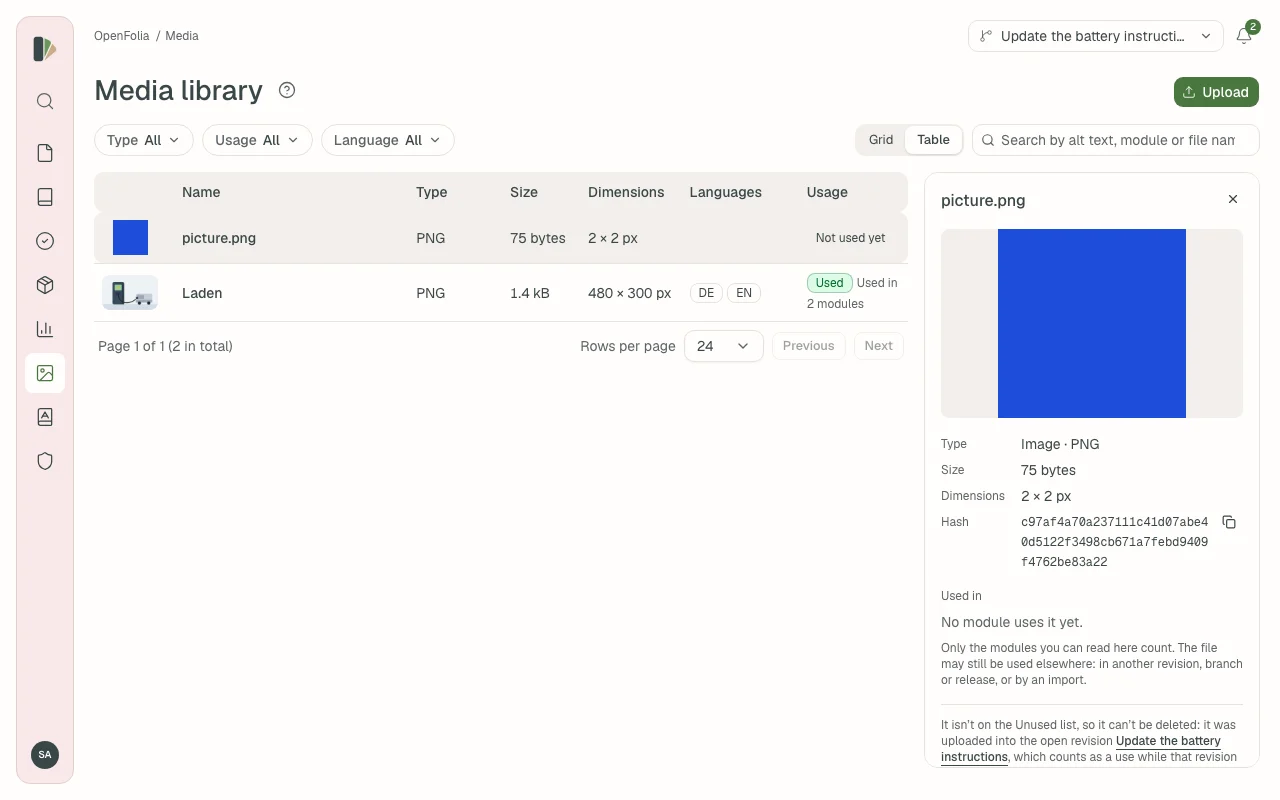
- It isn’t on the Unused list, so it can’t be deleted: it was uploaded into the open revision …, which counts as a use while that revision is open. Merge or abandon that revision first.
- It isn’t on the Unused list, so it can’t be deleted: it is still used elsewhere, or it was uploaded less than 24 hours ago. Wait a day, or look where it is used.
- Deleting files needs editing rights over all content. Ask an admin.
Show on the Unused list jumps to the file there when it can be deleted.