

Storage used
How much storage the uploaded files take, against the limit if one is set, and how to free room.
Images, attachments and the archived PDFs of releases take storage. An installation can have a storage limit. Admins see how much is used and what takes the most.
See the storage used
- Choose Admin in the sidebar, then System.
- The Storage card shows the total, for example 1.7 MB used. With a limit it shows … of … used, a bar and the share of the limit.
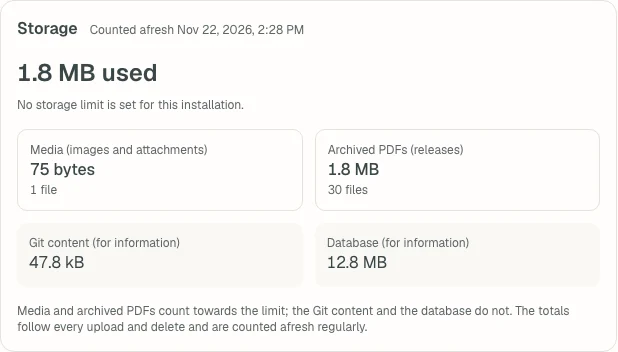
Below the total, the card splits it up:
- Media (images and attachments) and Archived PDFs (releases) count towards the limit.
- Git content (for information) and Database (for information) do not.
The totals follow every upload and delete, and are counted afresh regularly. The card says when: Counted afresh …. Largest files, below the cards, lists the uploaded files from the largest down. Choose one to open it in the media library.
Without a limit, the card says No storage limit is set for this installation. Whoever runs
the server sets the limit (CCMS_STORAGE_LIMIT_BYTES, see Settings).
When storage runs out
From 80 % of the limit, the card warns: Storage is 85 % full, say. Once the limit is reached, it says The storage limit is reached, and every new upload is refused. A person who uploads then reads This installation’s storage is full: the file was not stored. Delete files nobody uses, or ask an administrator for more storage.
Archived release PDFs are never refused.
To free room, choose Show unused files on the card. It opens the media library's Unused list. See Upload and clean up files.