

A manual’s history
See every version of a manual, compare its details and outline between two, and restore an older one.
Every save point of a manual makes a new version: a module added or removed, the order changed, a setting changed. Its history works like a module's.
Open the history
- Open the manual in Manuals.
- Choose … at the top right, then History.
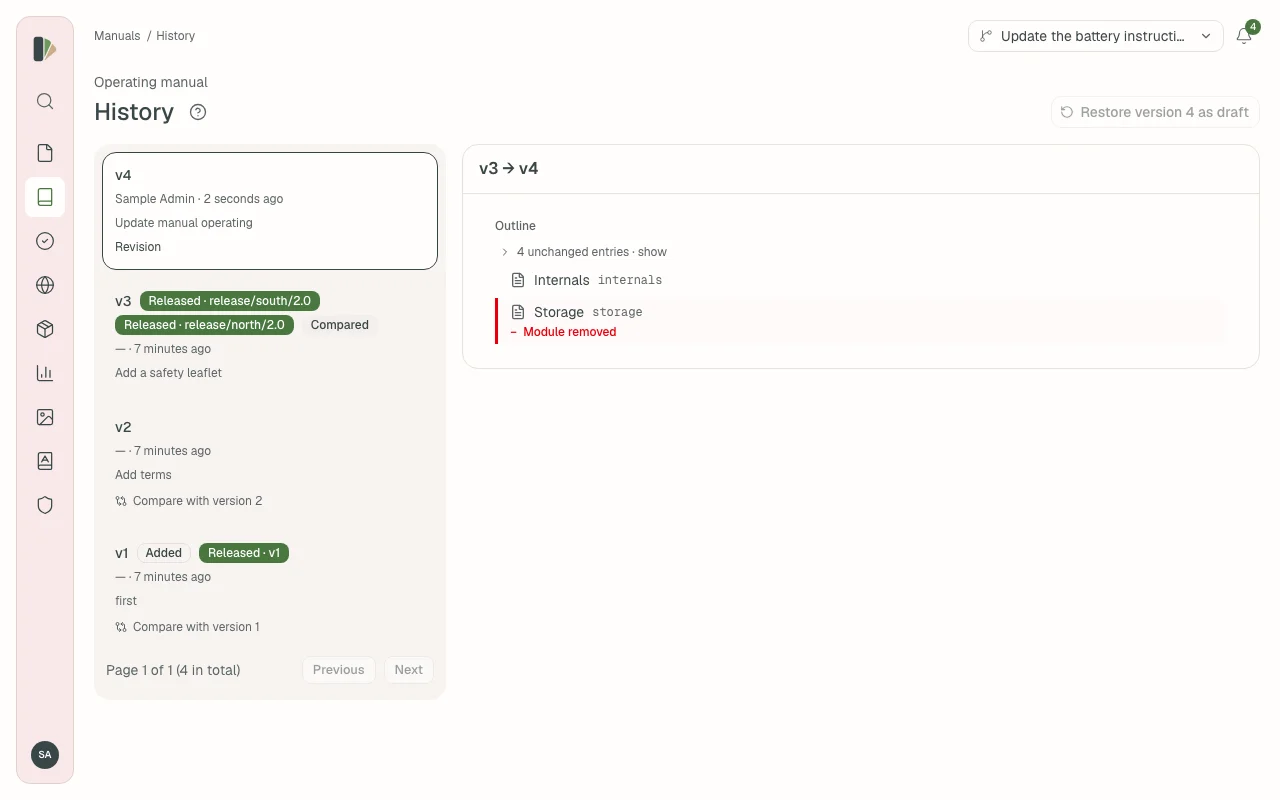
The versions are listed newest first, each with who made it, when and in which revision. Released marks a version in a release.
Compare two versions
Choose a version: it is compared with the one before it. The comparison shows the manual's details and its outline: entries added, removed or moved. Unchanged entries are folded into a line such as 4 unchanged entries · show: choose it to open them. To compare with another version, choose Compare with under it.
Restore an older version
- Choose a draft revision at the top.
- In the history, choose the version to bring back.
- Choose Restore … as draft, for example Restore version 3 as draft.
The manual reads as that version in your revision. The toast offers Undo.
A deleted manual has a history too: choose the manual's title at the top, turn on Show deleted and choose it. See Duplicate, rename, deprecate or delete a manual.