

Review settings and terms
Changes to the project settings, terms and page designs are reviewed like content.
The project settings, the terms and the page designs live in the content, beside the modules. A change to them goes into a revision and through the same review: nothing applies until it is merged.
Make the change in a revision
- Choose or start a revision. An administrator changing the project settings sees Changes are saved into the revision “…” and reviewed before they apply.
- Change the settings, a term or a page design.
- Submit the revision as any other; see From draft to main.
Open in review above the settings goes straight to the revision's review.
What the reviewer sees
Each such change is an item of its own, marked Configuration, Term or Page design, with
the file it is in, such as openfolia.yaml. What changed: lists the parts that changed, for example
moduleTypes/procedure.
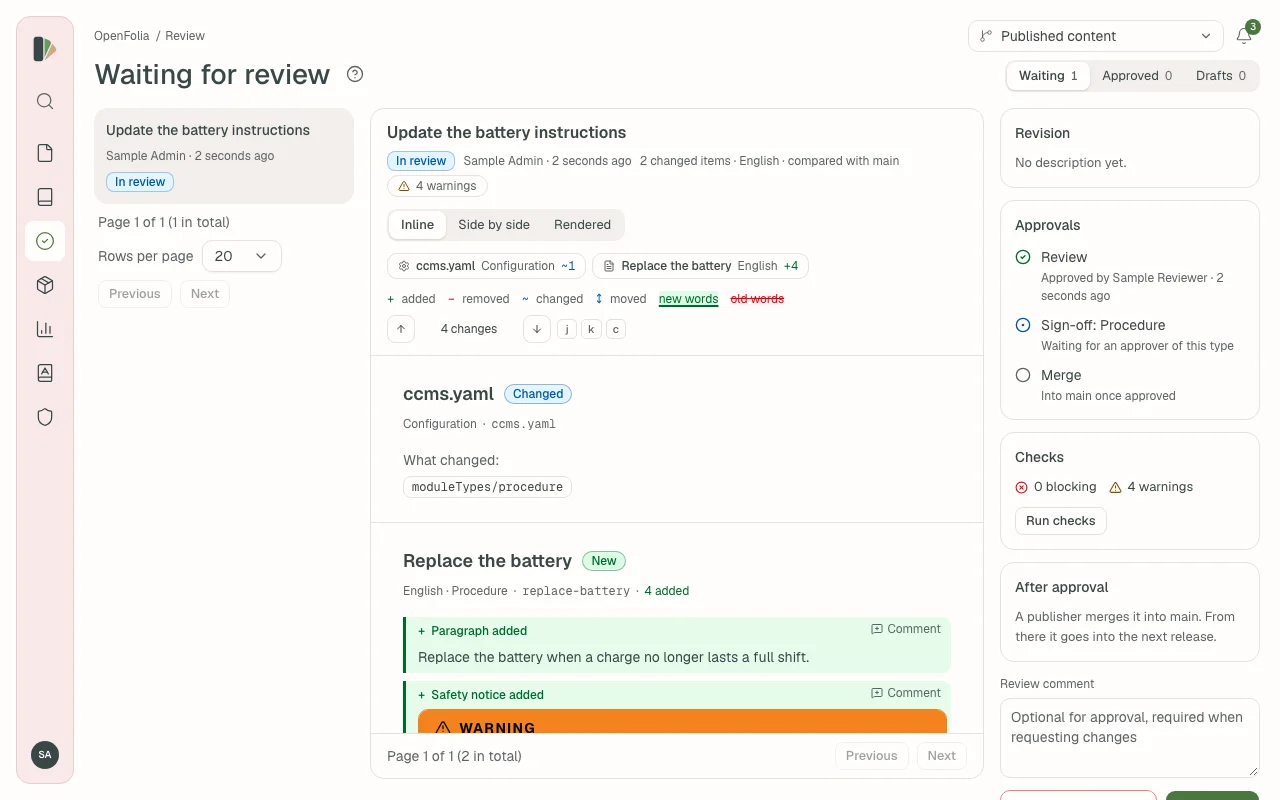
These items look the same inline, side by side and rendered. Their changes count in the item's chip as ~1 for each changed part.
What they need
- A change to the project settings needs the review and every sign-off there is. See Approvals and sign-offs.
- A term or a page design needs the review only.
- Only someone whose role covers all content may review them.
While one revision changes the project settings, another cannot: Another revision is changing the project settings. They can be changed here once it is merged or abandoned.