

Comment on a block
Ask about a block in the review, reply, resolve, and edit or delete your own comments.
In the review, a comment sits on the block it is about, in a thread others can reply to. The revision's author and everyone who may review it can comment, while it is a draft, in review or approved.
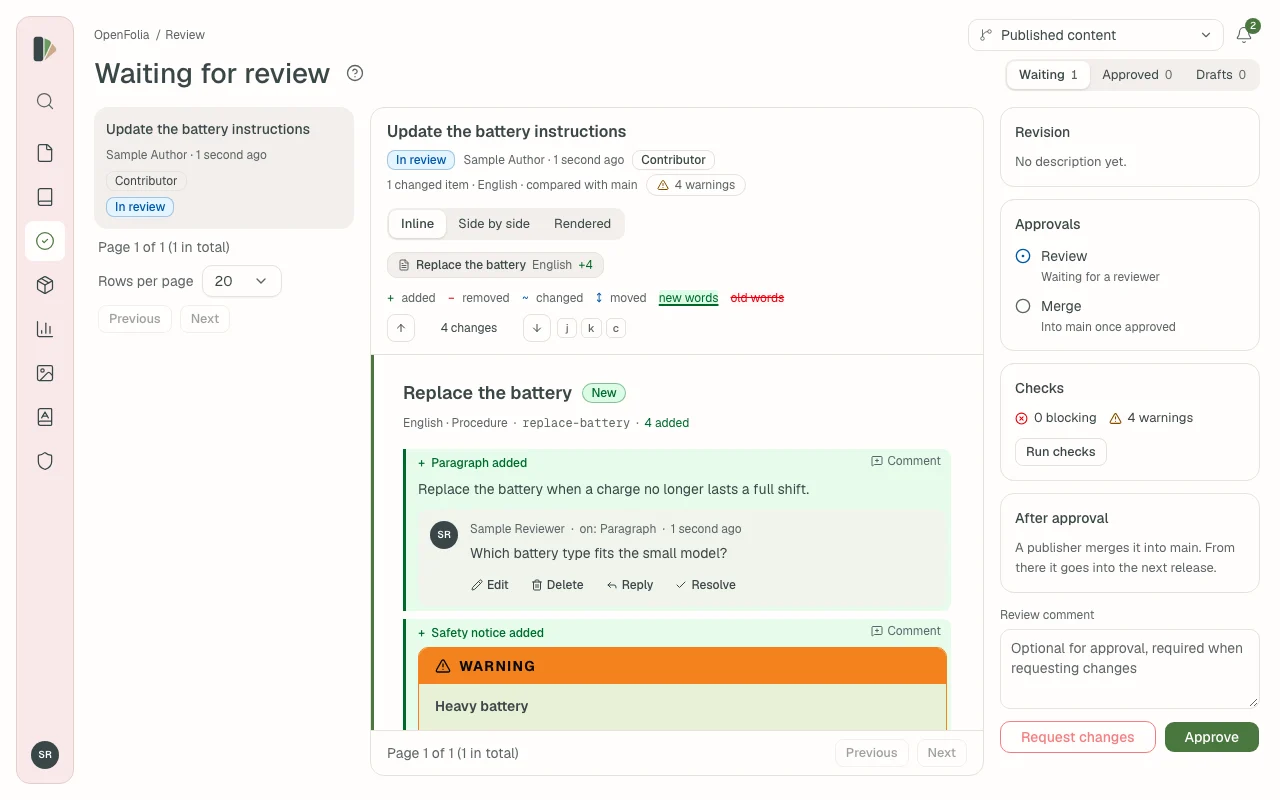
Add a comment
- Find the block in the changes. Every changed block has Comment at its top right.
- Choose Comment and type in New comment.
- Choose Comment below the box, or press Ctrl Enter (⌘ Enter on a Mac).
Esc cancels. With the keyboard, move to a change with j or k and press c to comment on it. In the Rendered view, Comment is beside each change in the list above the page.
Your comment shows at once and is sent in the background. If it could not be sent, it says Not sent: choose Try again or Discard.
Reply and resolve
- Reply opens Your reply under the thread.
- Resolve marks the thread done. It folds to one line marked Resolved; Reopen opens it again.
Edit or delete your own
Only your own comments show Edit and Delete.
- Edit turns the comment into a box. Change it and choose Save. The comment then says edited beside its time.
- Delete removes it at once. The message Comment deleted. offers Undo for a few seconds. A first comment that has replies leaves Comment deleted above them, so the replies still make sense.
When the block is gone
A later save point may remove the block a comment was on. The comment stays, under A comment on a removed block at the end of the module, marked Its block is no longer there.